Check printing software to print your own business checks — pay once, no monthly fees.
$50 once vs about $180/yr for Checkeeper.
Checkeeper is $14.99 a month, $179.88 a year. Competitor prices as of Oct 2, 2026.
Windows check printing software with MICR printing, a logo and signature, and a check register. Your data stays on your computer.
Card, Apple Pay, Google Pay
Refunds within 48 hours of purchase by contacting support@ownchecks.com. After 48 hours, all sales are final. Try the free trial first. Checks print with a VOID watermark until you activate.
What you need: a Windows 10 or 11 (64-bit) PC, a laser printer, blank check stock, MICR toner recommended.
- No subscription. No print credits.
- It needs the internet only to download it and to activate your key once. Your check data never leaves your PC.
- $50 for your first computer. Add more for $15 each, up to 10 per buyer (per purchase email).
On the page
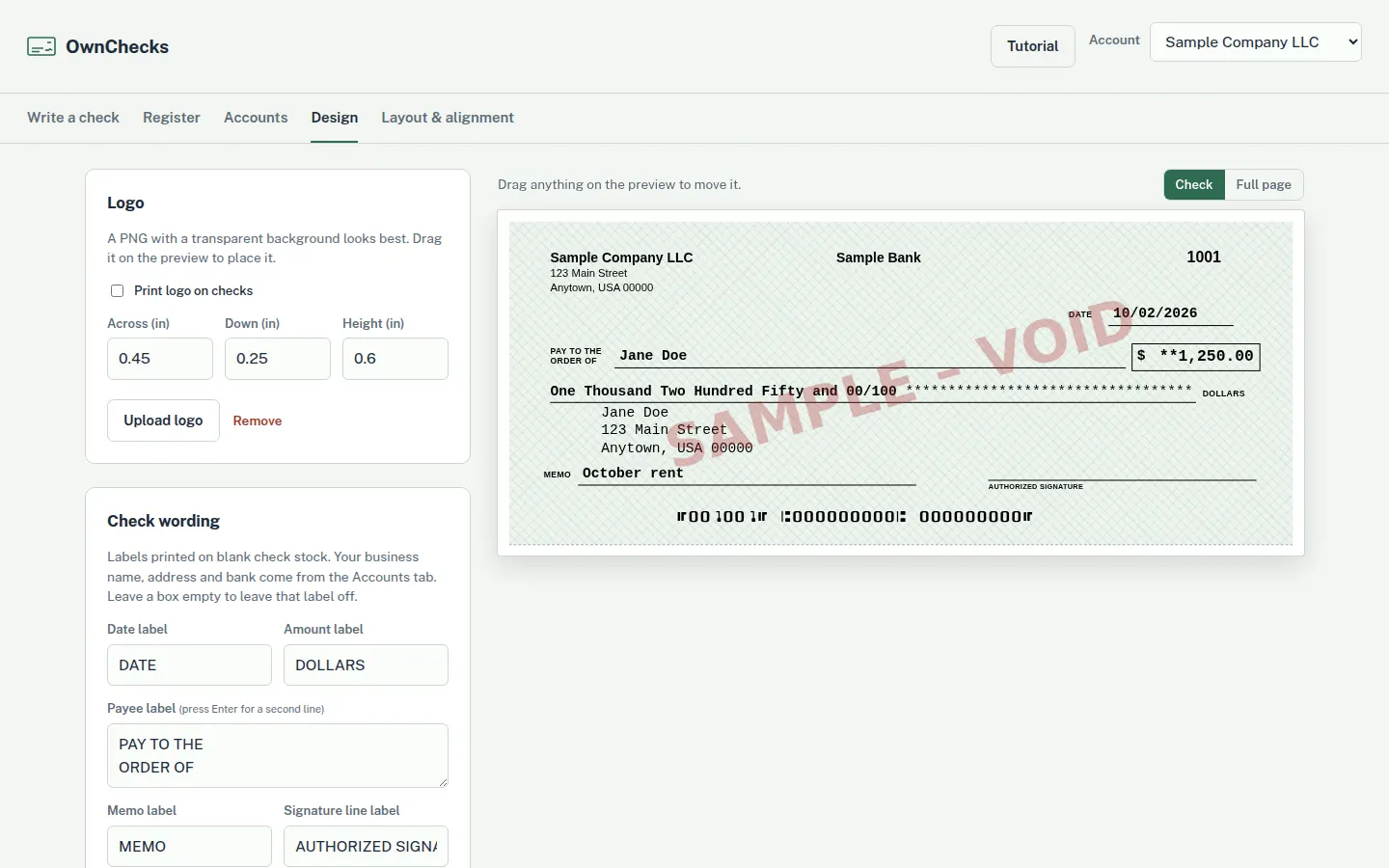
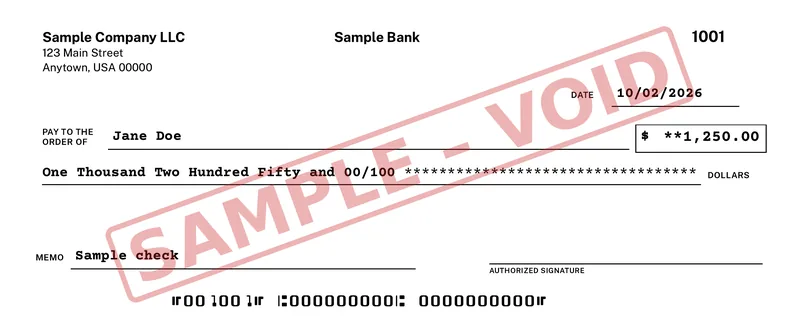
Watch a sample check fill in
Payee, amount, the amount in words, then the MICR line. Sample data. Routing and account numbers are zeros.
The trial prints a VOID watermark until you activate. Print a free test page to check alignment, then confirm acceptance with your bank.
Card, Apple Pay, Google Pay
Refunds within 48 hours of purchase by contacting support@ownchecks.com. After 48 hours, all sales are final. Try the free trial first. Checks print with a VOID watermark until you activate.
The software
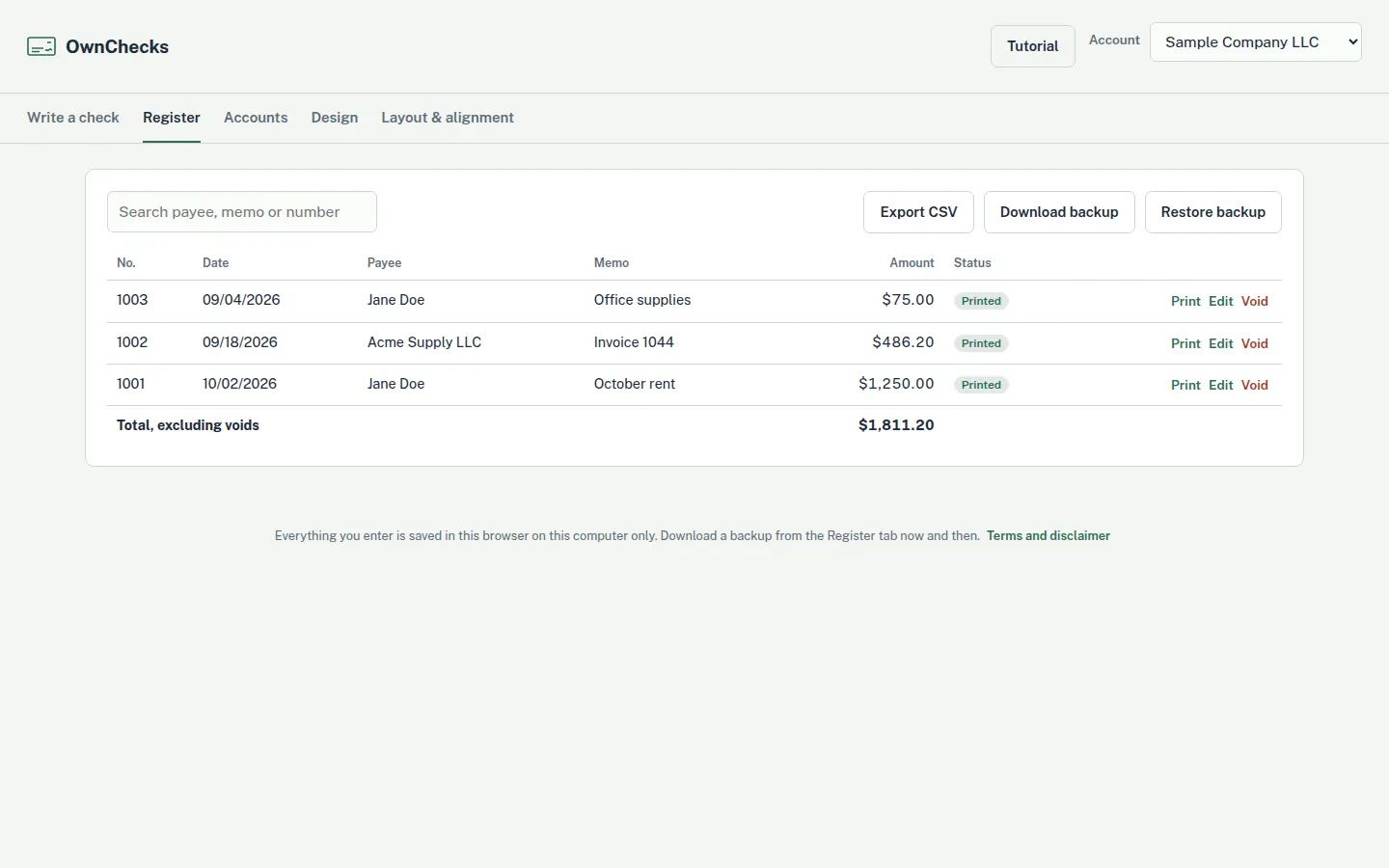
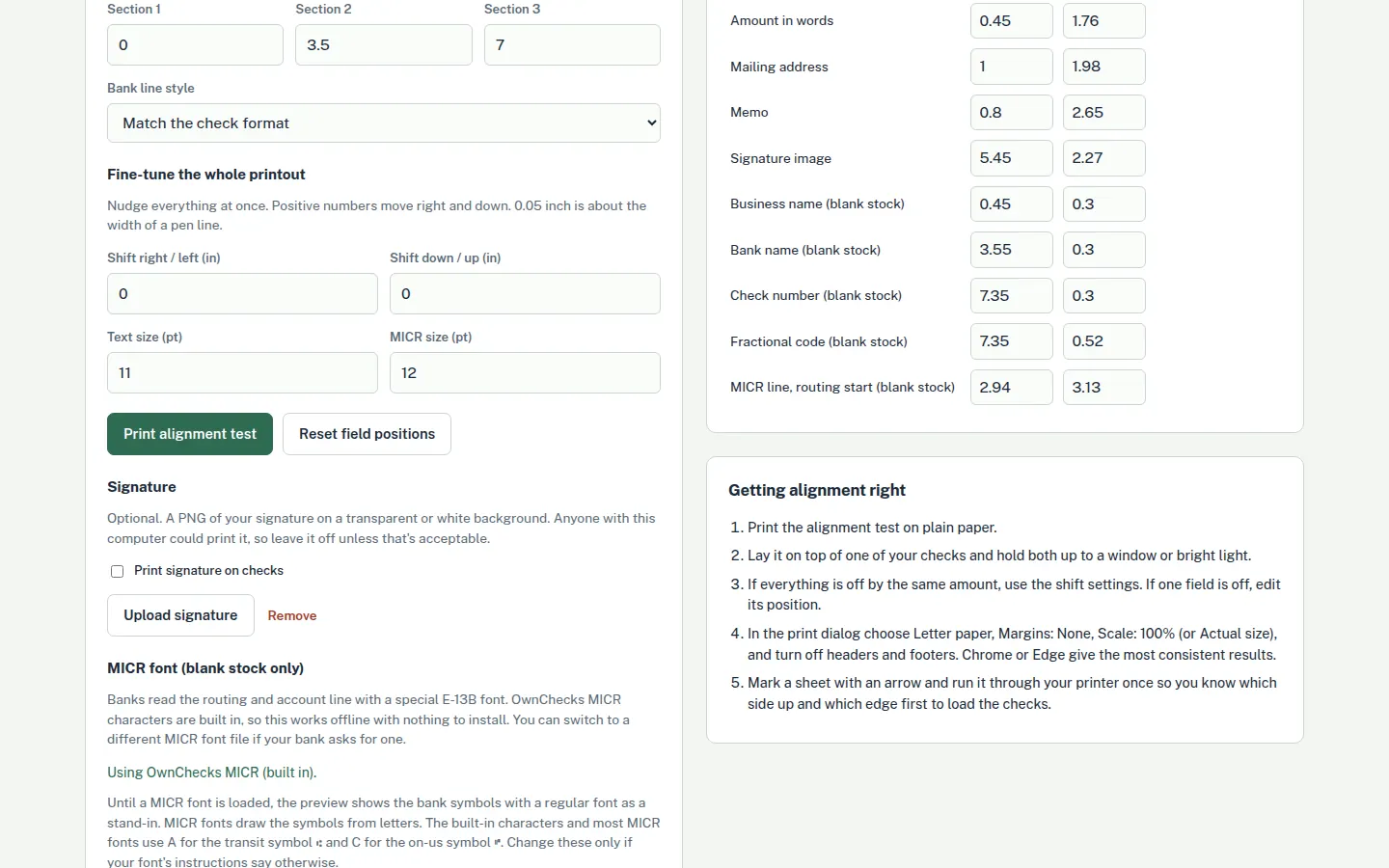
See the app
The register, the check designer, and the alignment screen. Every figure on these screens is sample data. What the check register does.
Card, Apple Pay, Google Pay
Refunds within 48 hours of purchase by contacting support@ownchecks.com. After 48 hours, all sales are final. Try the free trial first. Checks print with a VOID watermark until you activate.
How it works
How it works in 3 steps
Install the trial
Put it on a Windows PC and print a free test page to check alignment. Trial checks show a VOID watermark until you activate a license.
Set up the check
Add accounts and payees, then your logo and signature. Choose blank stock or a preset for pre-printed stock, and line the fields up.
Pay once and print
Buy the license. The confirmation page shows the key, and we email it. The key activates on the computers that order paid for. Print the check, and keep the register on the computer.
Card, Apple Pay, Google Pay
Refunds within 48 hours of purchase by contacting support@ownchecks.com. After 48 hours, all sales are final. Try the free trial first. Checks print with a VOID watermark until you activate.
What it does
The whole check, on your PC
Accounts and payees
Keep the accounts you write from and the people you pay in the app, on your computer.
A check register, with backup and restore
Record checks in a register. Back the file up and restore it when you need to. The backup stays with you.
Your logo and signature
Add your logo and signature to the check you print.
MICR on blank stock
Print on blank check stock with a MICR line in the original E-13B font.
Preset pre-printed stock
Or print on preset layouts for pre-printed check stock.
Field positions and an alignment wizard
Fine-tune where each field lands, and use the alignment wizard to line the page up.
On your PC, with no account
Your checks, payees and register stay on your PC. Nothing is uploaded. There is no cloud and no account to create.
One purchase
Buy once. Every future update is included, for as long as we sell it. No monthly fee, no print credits, and no cloud account holding your bank details.
Card, Apple Pay, Google Pay
Refunds within 48 hours of purchase by contacting support@ownchecks.com. After 48 hours, all sales are final. Try the free trial first. Checks print with a VOID watermark until you activate.
Who it's for
People who print their own checks
Small businesses
Print vendor checks on the Windows PC you already use. One payment, and no print credits.
Bookkeepers
Keep the register on the computer you print from. There is no cloud account and no multi-client portal.
Landlords
Pay for repairs and vendors from your own PC. This does not collect rent, and it does not move money.
Nonprofits
Pay once for the software. There is no subscription and no print-credit balance to refill.
Card, Apple Pay, Google Pay
Refunds within 48 hours of purchase by contacting support@ownchecks.com. After 48 hours, all sales are final. Try the free trial first. Checks print with a VOID watermark until you activate.
Cost
$50 once, against a yearly subscription
$50 once vs about $180/yr for Checkeeper ($179.88 a year). No print credits. No subscription. It needs the internet only to download it and to activate your key once. Your check data never leaves your PC. $50 for your first computer. Add more for $15 each, up to 10 per buyer (per purchase email).
1 year
3 years
5 years
Each Checkeeper bar is that many times the listed year price of $179.88. OwnChecks stays $50 once. This is arithmetic on the listed price, not a forecast. Competitor prices as of Oct 2, 2026.
The lowest price we found for a one-time license that includes all future versions. Checksoft Personal Deluxe is listed at $41.99. That is a lower shelf price, and its policy for future versions is not stated. See the comparison.
Full price comparison · Best check printing software · Checkeeper alternative
Card, Apple Pay, Google Pay
Refunds within 48 hours of purchase by contacting support@ownchecks.com. After 48 hours, all sales are final. Try the free trial first. Checks print with a VOID watermark until you activate.
Pricing
One price. One computer to start.
$179.88 a year
Competitor prices as of Oct 2, 2026. Checkeeper is $14.99 a month.
$50 once
For your first computer.
$50 for your first computer. Add more for $15 each, up to 10 per buyer (per purchase email).
Costs less than 4 months of Checkeeper. Pay once.
Updates are included, for as long as we sell it. Your license includes all future versions of OwnChecks released while we continue to sell the product. We may stop selling or updating it at any time; your installed version keeps working.
Card, Apple Pay, Google Pay
Refunds within 48 hours of purchase by contacting support@ownchecks.com. After 48 hours, all sales are final. Try the free trial first. Checks print with a VOID watermark until you activate.
What you need: a Windows 10 or 11 (64-bit) PC, a laser printer, blank check stock, MICR toner recommended.
Blank stock
MICR printing needs the right supplies
Printing a MICR line on blank check stock needs MICR toner or MICR ink, and check stock. A laser printer is recommended. You can also print on preset pre-printed check stock.
Print a free test page to check alignment. Trial checks carry a VOID watermark until you activate. Confirm with your bank that it will accept the checks before you rely on blank-stock printing. A test page does not prove bank acceptance. OwnChecks is not affiliated with any bank, and it does not move money.
Card, Apple Pay, Google Pay
Refunds within 48 hours of purchase by contacting support@ownchecks.com. After 48 hours, all sales are final. Try the free trial first. Checks print with a VOID watermark until you activate.

Questions
Does OwnChecks run on a Mac?
No. It is a Windows desktop app. Mac and Linux are not supported. Windows 10 or 11 (64-bit). Internet is needed to download and activate once..
Where does my check data live?
Your checks, payees and register stay on your PC. Nothing is uploaded. Your logo and signature stay there too. There is no cloud service and no account to create. You can back up the register and restore it on that computer.
Does it need the internet?
It needs the internet only to download it and to activate your key once. Your check data never leaves your PC.
Is there a monthly fee or a print credit?
No. $50 for your first computer. Add more for $15 each, up to 10 per buyer (per purchase email). There is no subscription and no print credits. Every future update is included, for as long as we sell it. There is no cloud account holding your bank details.
What do I need to print on blank check stock?
Blank check stock, plus MICR toner or MICR ink. A laser printer is recommended. You can also print on preset pre-printed check stock. You can fine-tune field positions, and an alignment wizard is included.
Will my bank accept a check I print?
That is your bank's decision. Print a free test page to check alignment, then confirm acceptance with your bank before you rely on blank-stock checks. A test page is not proof that a bank will accept the check. The software is not affiliated with any bank. MICR toner is recommended. Use the software only on accounts you own or are authorized to sign on.
What does the free trial print?
Checks print with a VOID watermark until you activate a license. Use the trial to print a test page and check alignment. It does not move money.
How do I get a license key?
Pay on the checkout page. Stripe processes the card. The confirmation page shows the license key, and we email it from support@ownchecks.com.
Card, Apple Pay, Google Pay
Refunds within 48 hours of purchase by contacting support@ownchecks.com. After 48 hours, all sales are final. Try the free trial first. Checks print with a VOID watermark until you activate.
Print a test page, then pay once.
Windows only. It needs the internet only to download it and to activate your key once. Your check data never leaves your PC. Every future update is included, for as long as we sell it. Your license includes all future versions of OwnChecks released while we continue to sell the product. We may stop selling or updating it at any time; your installed version keeps working.
Card, Apple Pay, Google Pay
Refunds within 48 hours of purchase by contacting support@ownchecks.com. After 48 hours, all sales are final. Try the free trial first. Checks print with a VOID watermark until you activate.